
Introducing Finance Search in the Agent API

Today we're launching Finance Search in the Perplexity Agent API. In a single tool call, Finance Search combines licensed financial datasets, real-time market data, and cited web sources.
Perplexity is already the preferred AI in professional finance, where analysts and investors use it to research companies and prepare investment materials. Finance decisions depend on answers that are accurate, current, and easy to verify.
Finance Search brings that same principle to financial agents. It retrieves time-sensitive financial information from structured sources instead of making the model search through generic web results. The benchmark results below show how that design improves accuracy and cost efficiency for finance queries.
Developers can use it to retrieve prices, fundamentals, transcripts, estimates, and market context without integrating each licensed provider separately.
Current financial data for agents
Finance Search supports questions that depend on current information, like the latest price or a line from an earnings call. When a request requires financial data, the model calls Finance Search and gets back cited results in a consistent format.
Developers can use it for:
A valuation lookup that includes the latest price, segment results, and earnings call commentary
A monitor that tracks material changes across balance sheets, income statements, cash flow statements, and other company disclosures
An earnings recap that connects reported numbers to what management said
A research assistant that follows estimate changes over time
Finance Search is the developer surface for live financial retrieval. Finance teams can use Computer for Professional Finance to create tearsheets, market monitors, earnings recaps, and research memos with current, cited data.
How it works
A developer sends a request to the Agent API, such as a valuation lookup, an earnings recap, or a market monitor. When the request requires financial data, the model calls the Finance Search tool and routes to relevant licensed sources behind the scenes.
Finance Search returns cited results in a consistent schema, regardless of provider. The agent can use those results to answer the user, generate a chart or memo, or continue a longer workflow.
That stable tool interface makes Finance Search easier to build with. Applications do not need to account for every provider separately, and the tool can add new sources or categories without forcing developers to rebuild around them.
Benchmark results
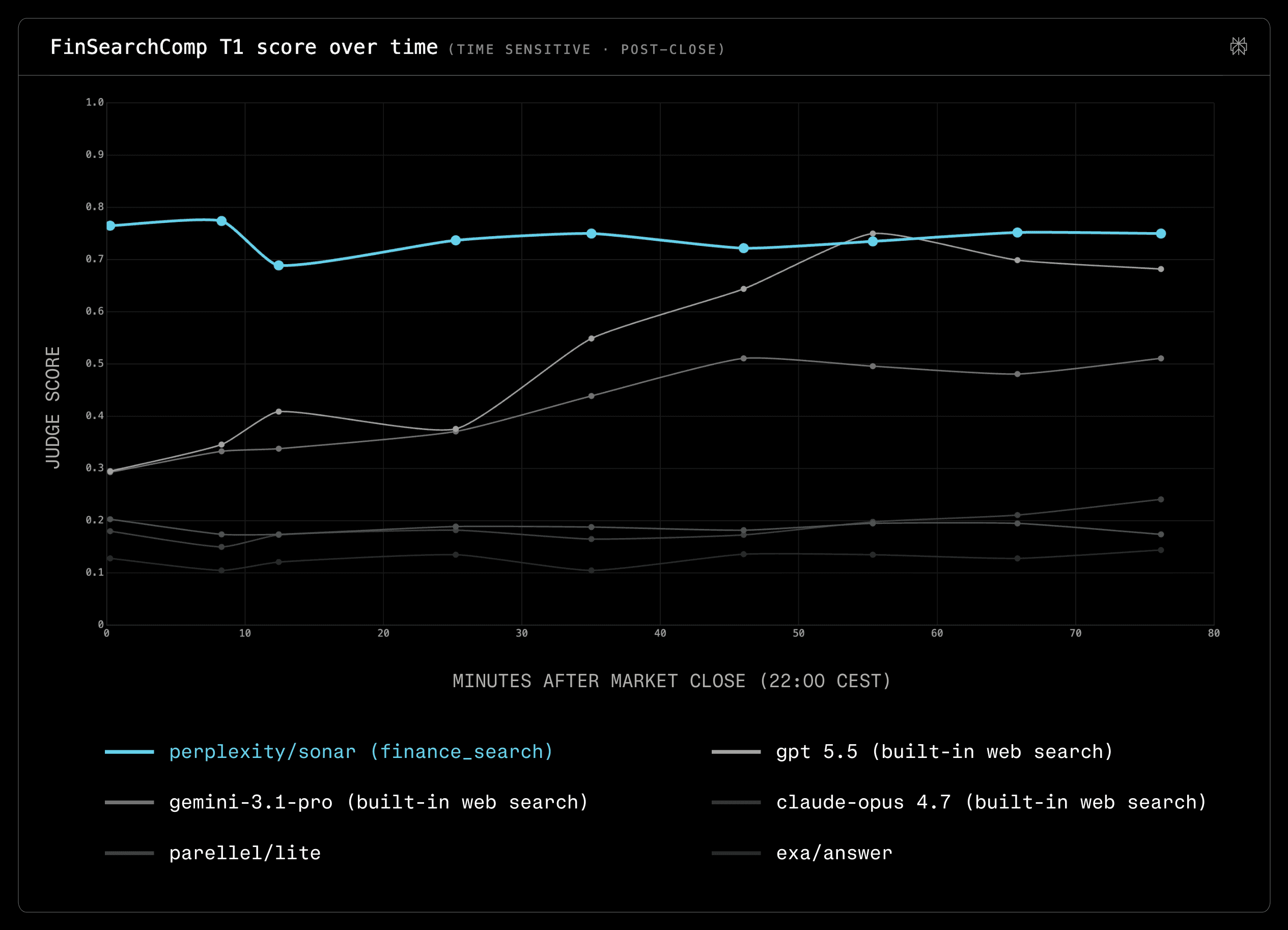
We evaluated Finance Search on FinSearchComp T1, a time-sensitive financial data retrieval benchmark measured after market close.
In the first chart, Finance Search starts with the highest accuracy for live financial data and remains the most consistently accurate configuration over time.
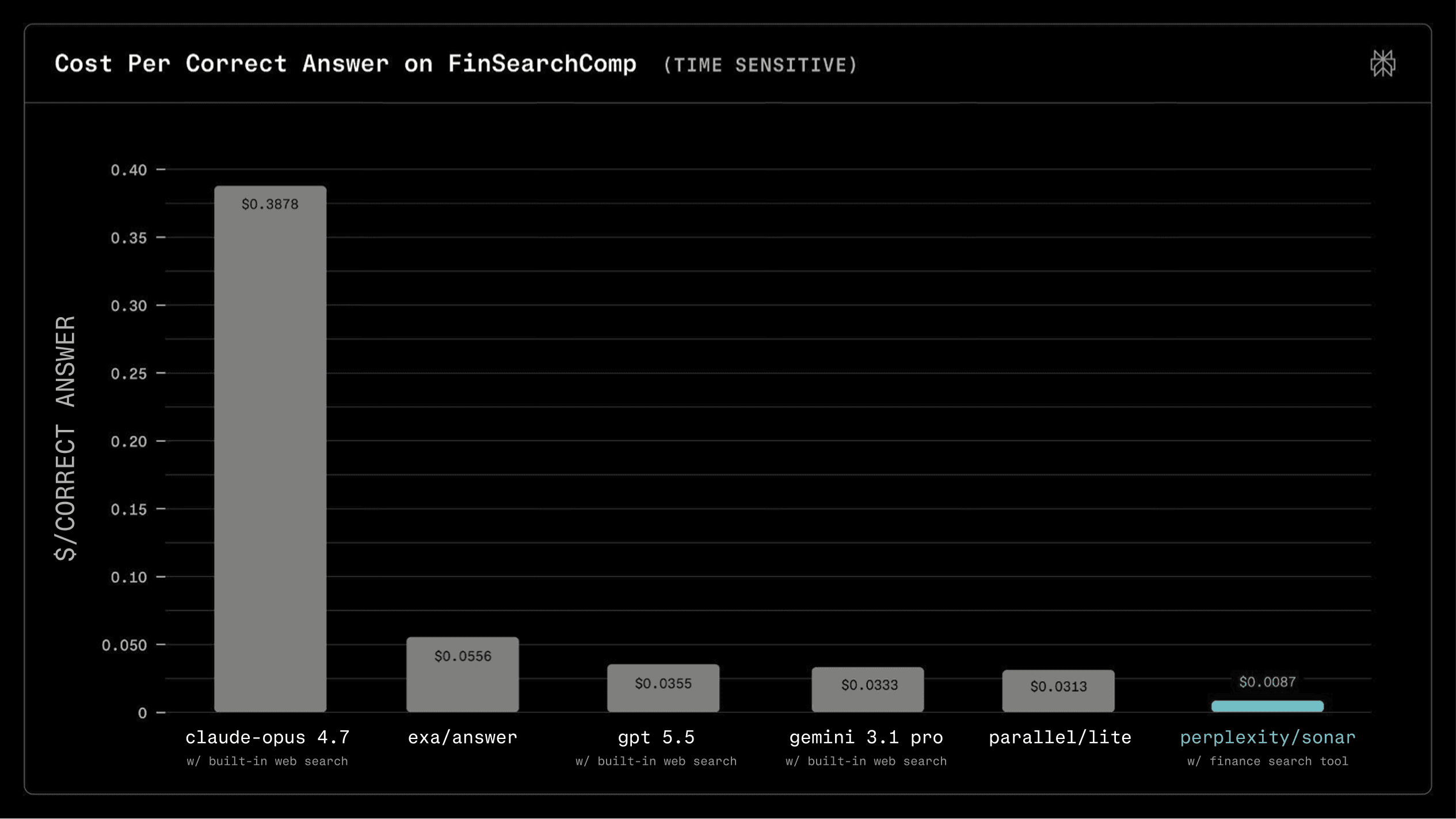
The second chart shows the cost advantage on FinSearchComp T1 queries.
Because Finance Search retrieves live financial data directly, the model can work from fewer, more relevant tokens instead of processing large amounts of web text to find the answer. Finance Search had the lowest cost per correct answer in the cohort.
Control and trust
Every Finance Search result includes inline citations, so developers can see which source produced an answer and which figure the model used.
Developers can choose the model, view token usage, and configure Finance Search for their application. The docs include the configurations that performed best in our benchmark, so teams can start from tested defaults.
Read the Finance Search docs to get started.